
Hi, I’m Jun, a UX Design student at the University of Michigan, with minors in Human-Centered Artificial Intelligence and Business.
Milieu
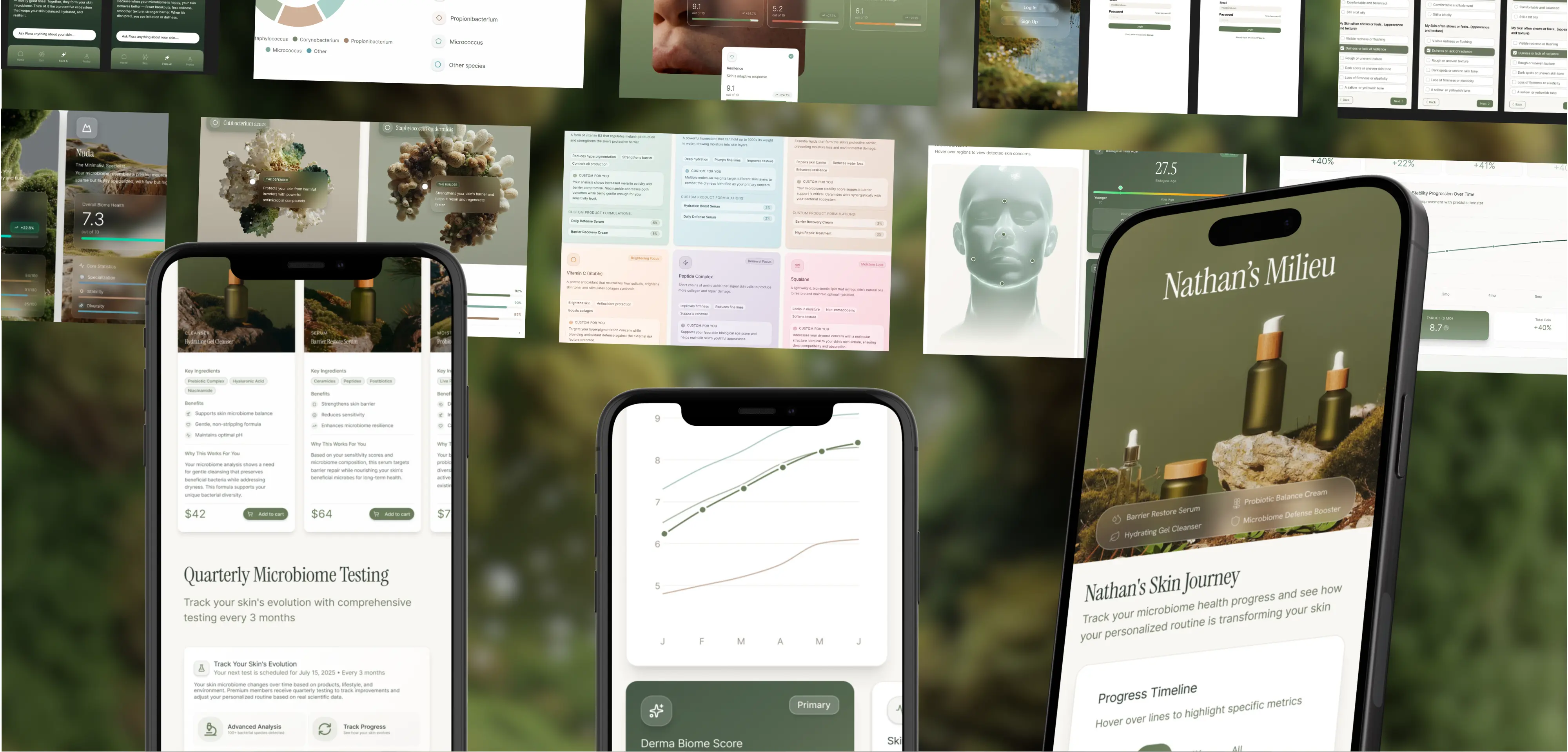
Crafting a mobile app for a startup that is redefining personalized skincare by using DNA
Role
UX Designer
Timeline
5 Months
Team
2 Project Managers
8 Software Developers
2 UX Designers
Platforms
Figma
SwiftUI
Background
The Why
Milieu is a skincare startup focused on personalization. By combining skin data with tailored formulations, Milieu creates custom skincare routines designed to adapt to individual needs.
Milieu was approaching launch, but the product experience lived primarily on the web. To support customers across platforms, the team needed a mobile app that could translate their existing web experience into an intuitive mobile interface. The goal was to give users access to their personalized skin data, routines, and progress on the go, without losing clarity on desktop.
Research
Understanding Users
Designing for mobile required more than resizing Milieu’s existing web layouts. Mobile users interact differently. They scan faster, use one hand, and expect information to be surfaced progressively rather than all at once. Many mobile web experiences simply compress desktop layouts into vertical scrolls, which can overwhelm users and bury key insights.
To address this, I explored mobile-native patterns for presenting dense skin data and routines. Instead of large text blocks and long vertical flows, I researched and applied components such as dropdowns, horizontal carousels, and modular sections that allow users to reveal information when they need it. This made complex data feel lighter, more approachable, and easier to navigate on a small screen.
Because Milieu's customers will switch between web and mobile to track their skin progress, both the web and app had to be consistent. I focused on maintaining shared information architecture and terminology, and also adapting interactions to feel native on each device so users don't need to relearn where information lived or how to access it.
Synthesis
Goals & Success Metrics

Goals
Translate Milieu’s web experience into a mobile app that feels native and intuitive
Make personalized skin data easy to access, understand, and act on
Ensure consistency across mobile and web to support cross-platform use
Success Metrics
Users can quickly find key skin insights and routines on mobile
Reduced cognitive load when viewing dense or data-heavy content
Clear information parity between mobile and web, without user confusion
Ideation
Information Architecture
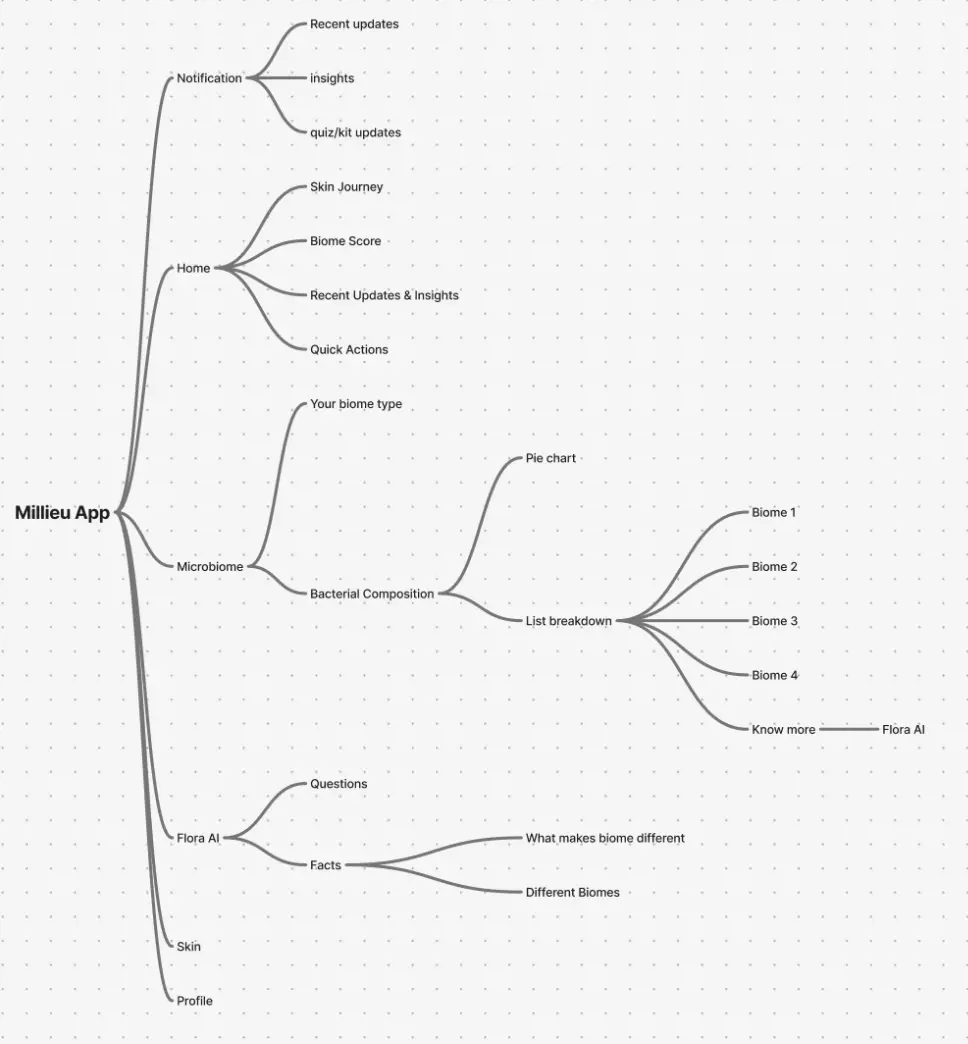
The information architecture was designed to prioritize clarity while supporting Milieu’s data-rich experience. Core features such as skin insights, microbiome data, and updates are surfaced early through the Home and Notifications sections, allowing users to quickly access the most relevant information.
More complex content, like bacterial composition and biome breakdowns, is progressively revealed through structured pathways using visual summaries, lists, and educational support via Flora AI. This approach helps users move from high-level insights to deeper details without feeling overwhelmed, while maintaining consistency across mobile and web experiences.
Iteration
Changes
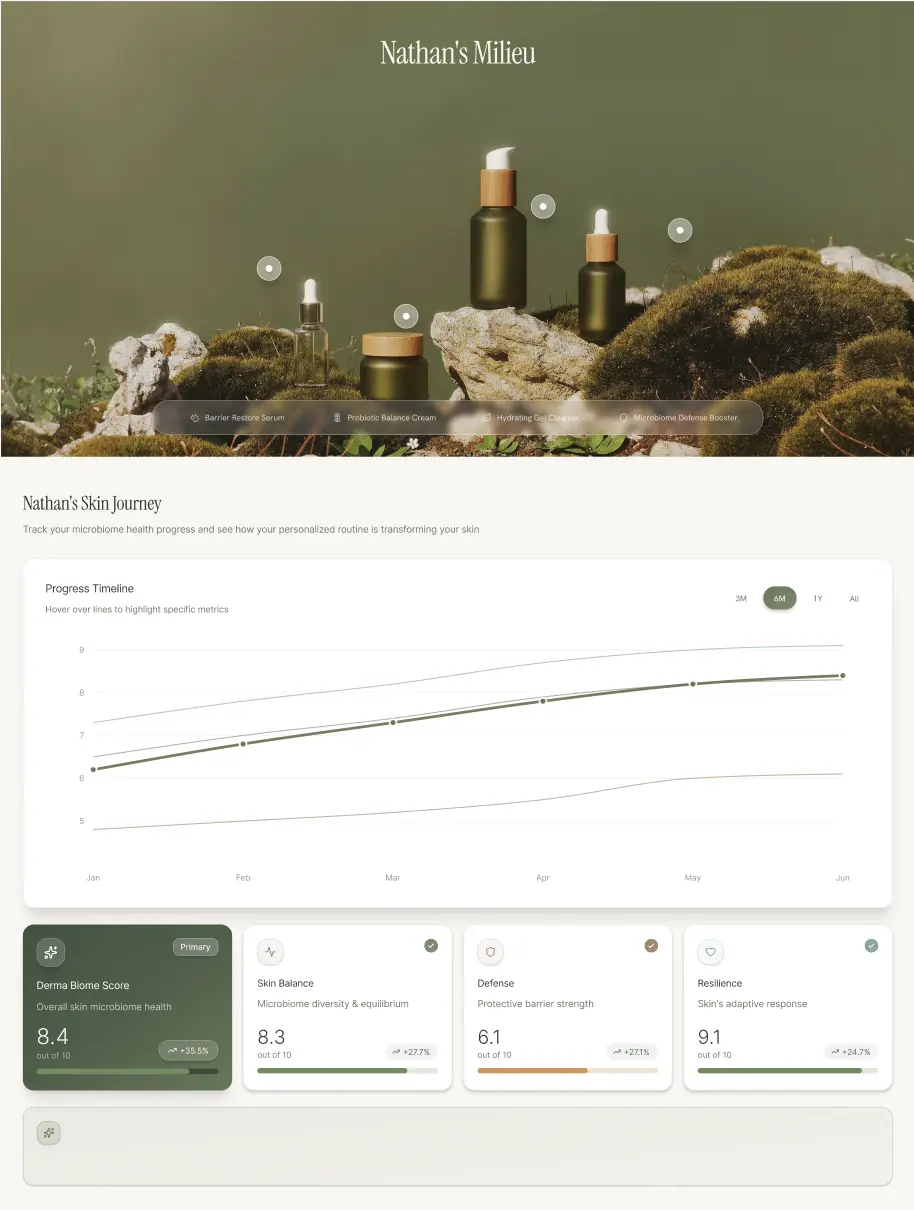
The left image illustrates the dashboard designed for desktop, with dense layouts, hover-based interactions, and wide data visualizations. Translating this experience to mobile required rethinking how information was surfaced instead of resizing components. I restructured the hierarchy to emphasize the most important skin insights first, allowing users to quickly understand their progress at a glance.
Desktop-specific interactions, such as hover states and tooltips, were replaced with mobile-native patterns like tap interactions and expandable sections. The progress chart was simplified to improve legibility on smaller screens, and key metrics were moved into a horizontal carousel to reduce vertical scrolling while keeping related data grouped together.
Progress Timeline
Hover over lines to highlight specific metrics
3M
6M
1Y
All
J
F
M
A
M
J
5
6
7
8
9
The progress timeline allows users to track changes in their skin health over time by selecting time ranges and viewing trends directly within the graph. On mobile, hover-based interactions were replaced with tap and selection states, making the chart easy to explore with one hand while maintaining clarity across multiple data lines.
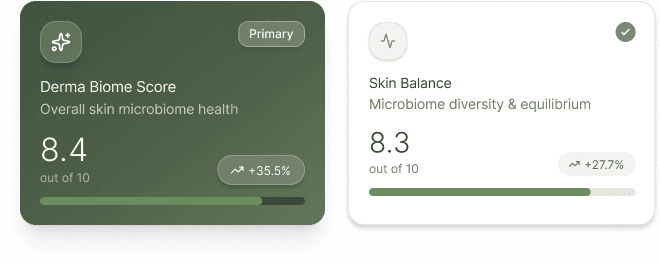
Key scores, such as the Derma Biome Score and Skin Balance, were surfaced as individual cards and organized into a horizontal carousel, allowing users to quickly scan core metrics without excessive vertical scrolling.
Final Product
High Fidelity
These two mobile views support Milieu’s core customer journey, from tracking skin health to managing membership and products. The dashboard surfaces personalized insights, progress over time, and quick actions, allowing users to understand their skin status at a glance and take immediate next steps. The membership and account views centralize subscription details, testing schedules, and order history, giving users clear visibility and control over their personalized skincare ecosystem.
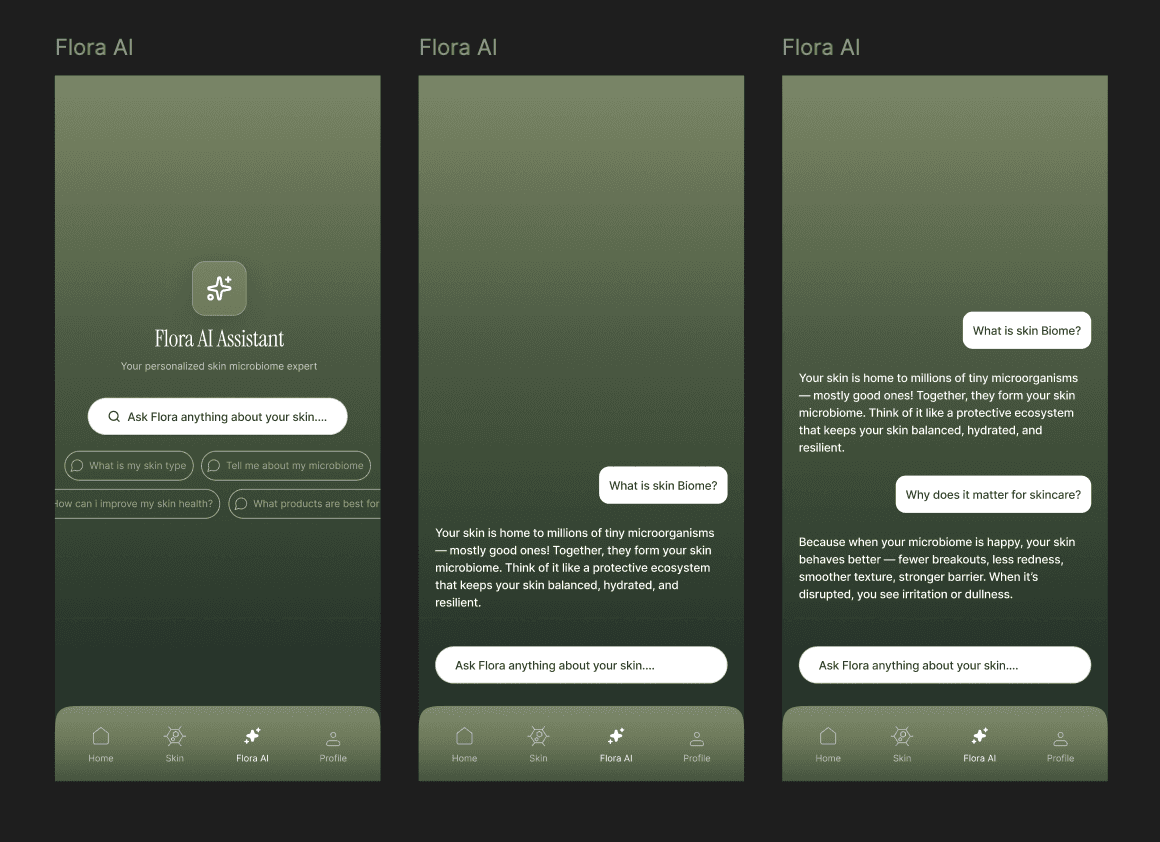
Another aspect we implemented was the Flora AI view, which serves as a guidance layer within the app, helping users better understand their skin microbiome and personalized results. Designed as a conversational interface, it allows users to ask questions in natural language and receive clear, approachable explanations about complex skin concepts. The experience balances depth with simplicity, surfacing relevant information without overwhelming users, and reinforces trust by framing Flora AI as a supportive expert that is personalized to the user.
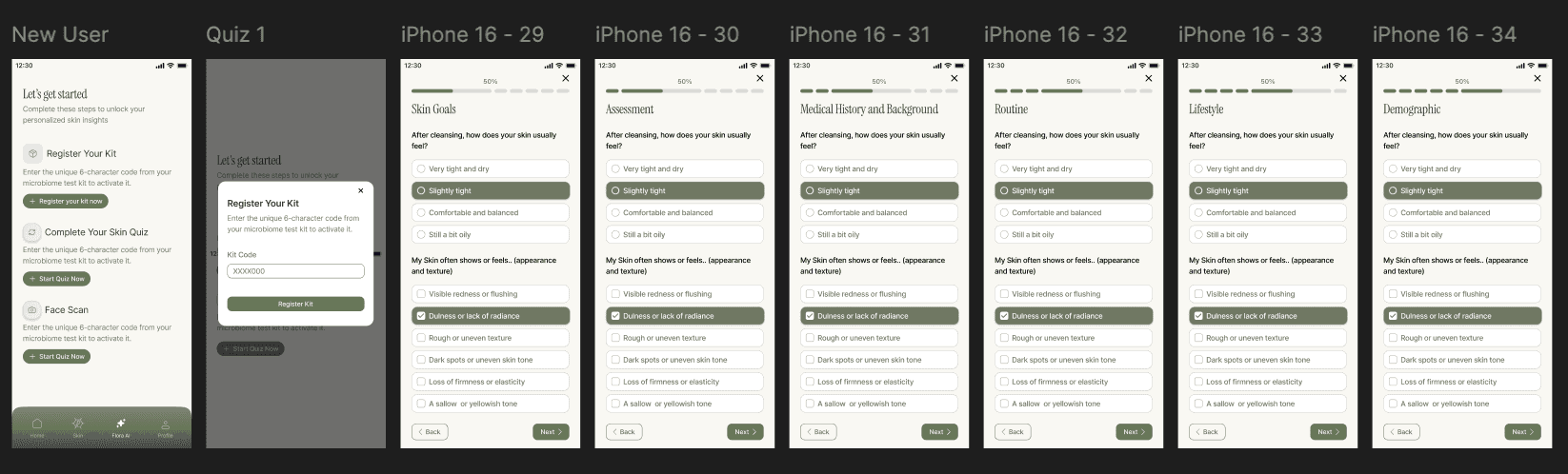
As users enter the application, we also created an onboarding and quiz flow, designed to gradually collect essential skin, lifestyle, and demographic information. Questions are broken into focused steps with clear progress indicators, helping users understand where they are in the process and what remains. By structuring the quiz into manageable sections and using simple selection patterns, the flow feels approachable and intentional, which sets the foundation for accurate personalization.
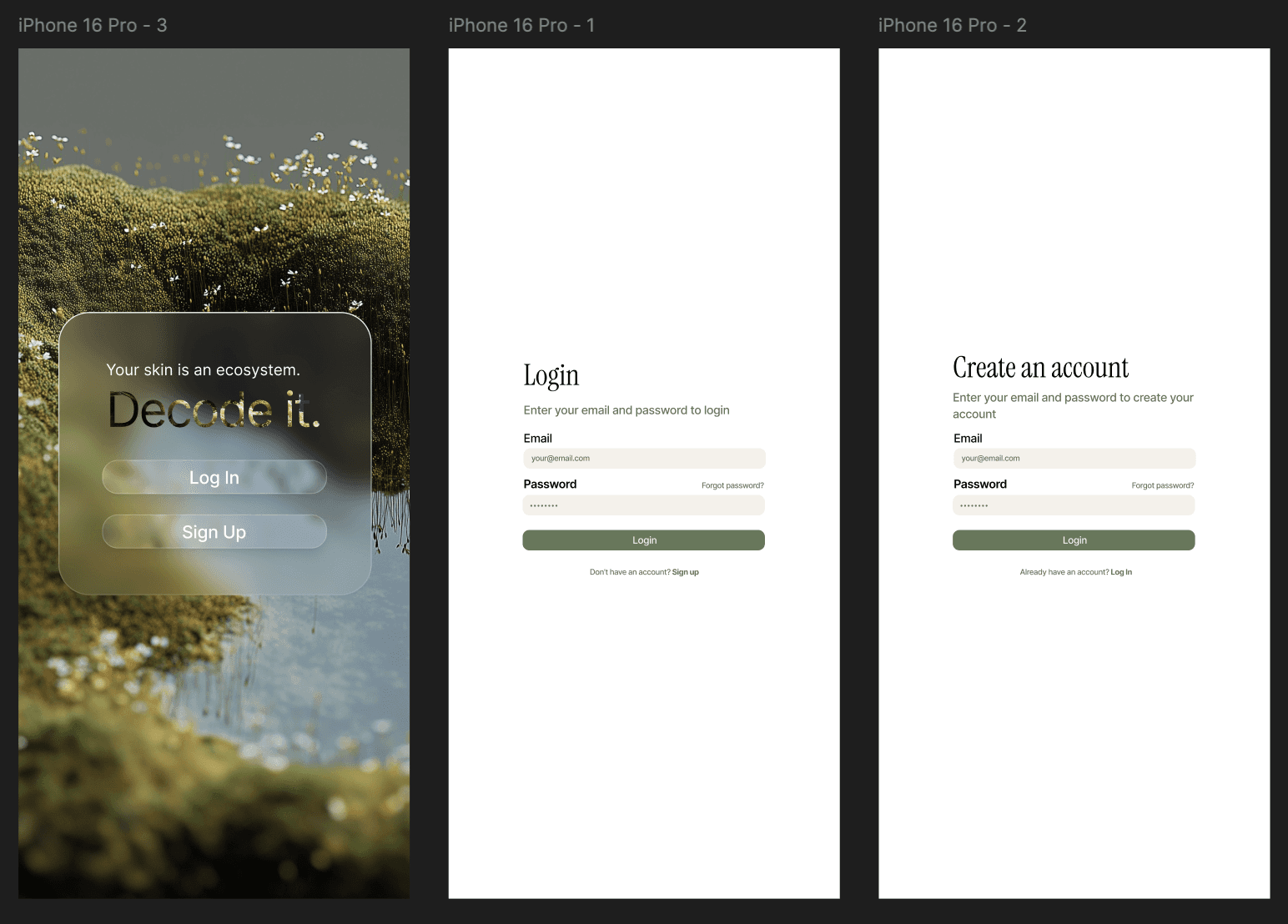
I was also asked to create authentication screens to introduce Milieu’s core branding. The landing screen establishes brand tone and sets expectations, while login and account creation flows are streamlined to reduce cognitive load. Clear visual hierarchy, minimal inputs, and consistent styling help users move quickly from entry to engagement.
Final Product
High Fidelity
Looking Forward
Reflection
This project was a meaningful learning experience for me, both as a designer and as a collaborator. It was one of the first times I worked closely with another designer on a fast-moving product, which pushed me to think more deliberately about alignment, communication, and shared decision-making. We spent a lot of time defining a clear information architecture and dividing ownership across dashboard views, which helped us move quickly while still keeping the experience cohesive.
Milieu also challenged me in new ways as a UI-heavy project. The company already had a well-defined and polished design system, so much of my work focused on translating that system thoughtfully into mobile rather than reinventing patterns. Compared to previous projects that leaned more heavily on research and discovery, this experience sharpened my visual design skills, attention to detail, and ability to design within established constraints.
Most importantly, working with a startup that was nearing launch made the impact of my work feel very real. Designing for a product at this scale, with real users and real timelines, gave me a stronger sense of responsibility and confidence as a designer. Seeing how design decisions could directly support a company preparing to launch reinforced my excitement for building products that are both thoughtful and tangible.